
Once you have set up the Serial number handler at the server and the WATS Client, you can easily GET new serial numbers or MAC addresses using your application.
Using LabVIEW
Use the built in WATS MES toolkit to get a serial number or MAC address.
Using TestStand
Use the .NET API to get a serial number or MAC address.
Using C#
When using C# and the WATS Client .NET API, a SerialNumberHandler class can be created for a serial number type by passing the name of the type to the class constructor. The returned object will be a singleton object for the serial number type. If the GetStatus() function returns Status.NotInitialized, then the Initialize() function needs to be called to set up the local offline storage. It can also be called whenyou want to change the pool-options.
The below code will create and initialize a serial number handler on the client:
using Virinco.WATS.Interface.MES.Production; // Namespace for the SN handler

// Create object
SerialNumberHandler sh = new SerialNumberHandler("MACAddress");

// Initialize handler with no pooling on the client side
sh.Initialize(null, null, SerialNumberHandler.RequestType.Take, true, 0, 0, "", "", testCode);

// Initialize handler with batchsize of 50 and minimum size of 5 serials
sh.Initialize(null, null, SerialNumberHandler.RequestType.Reserve, true, 50, 5, "", "", testCode);
The below example code will create a MAC Address type SN handler and assume it is already Initialized:
using Virinco.WATS.Interface.MES.Production; // Namespace for the SN handler

// Create SN handler object
SerialNumberHandler handler = new SerialNumberHandler("MAC Address");

// Continue only if pool-options are set up already
if (sh.GetStatus() == Status.Ready)
{
    // Get a single MAC Address
    string mac = handler.GetSerialNumber("123456789", "100200");

    // Get an array of 10 MAC addresses
    string[] macs = handler.GetSerialNumbers(10, "123456789", "100200");
}
Comments
5 comments
Did someone had have already this error once?
The error state "MACAddress is not initialized". Have you?: https://support.virinco.com/hc/en-us/articles/360013425540-Configure-Serial-number-handler-at-the-WATS-Client
Dear Tom
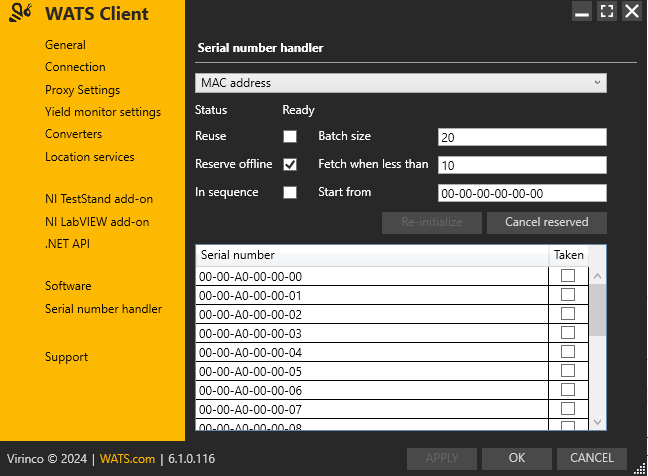
Yes I had initialized the serial number handler.
Now I reinstalled the WATS TestStand Plugin but unfortunately with the same result.
Hi, seems like a "spacing" issue?
Error log: "MACAddress", Serial number handler: "MAC Address"
Hi Tom
This was indeed the case.
Many thanks for the hint.
Please sign in to leave a comment.