Statistics Widget suggestion : add custom calculation
Answered
Hi
We want to have a dashboard at the production lines, to show how many units are coming in, and how many are coming out, shown as a table with a percentage.
Currently we fix the numbers with two "statistics overview" widgets, one for the first test operation, and one for the last.
This does not give us a percentage, though.
Could the "Statistics overview" widget be changed, so instead of specifying test reports and repair reports, we can specify any kind of report for the two columns?
And then also have a calculation field, where we can specify a row level calculation? (so it doesn't add complexityy to the backend aggregations, but can actually be done clientside)
This would enable us to create these metrics fast, and minimize cluttered views.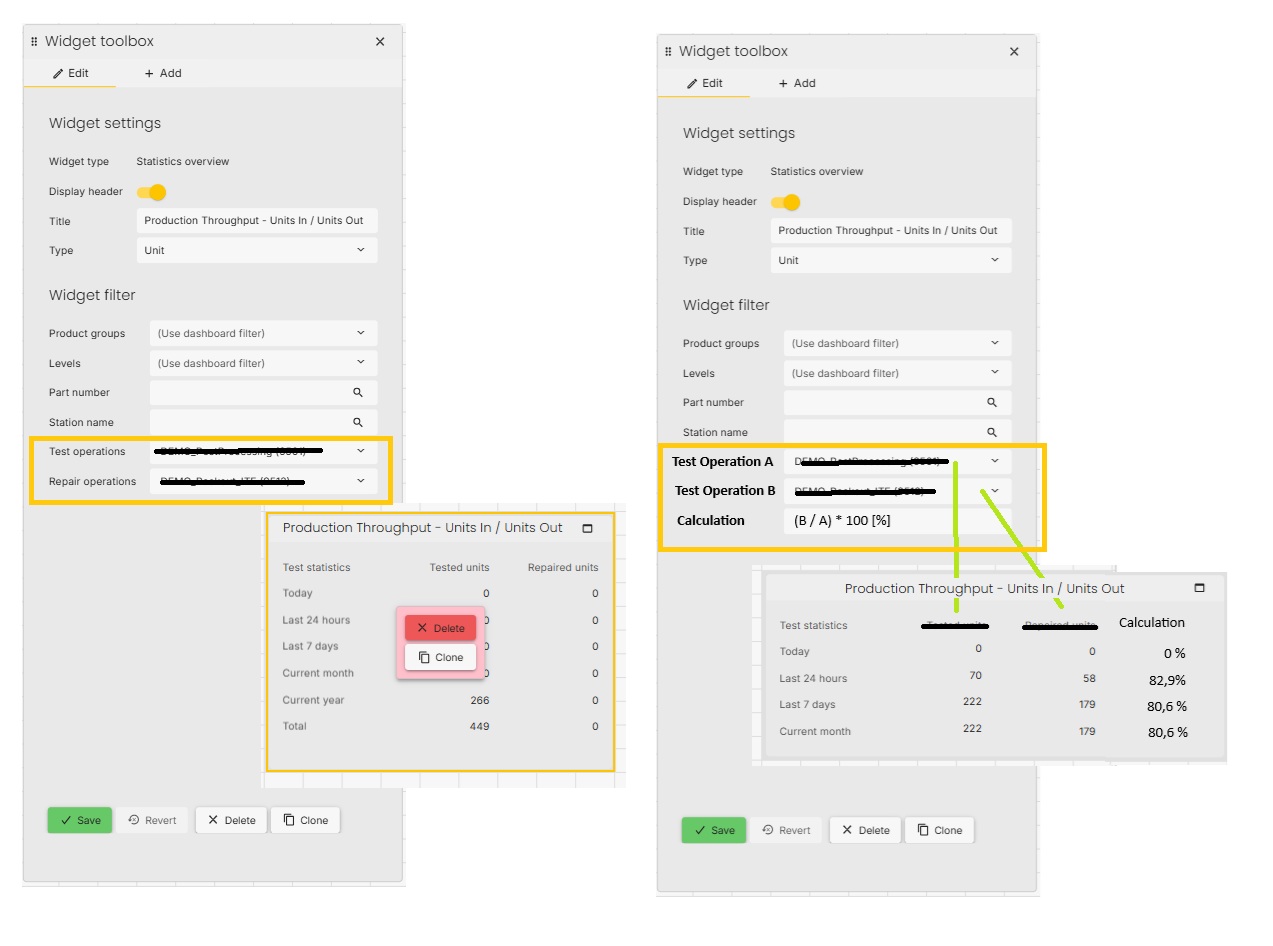
(Andreas, this is the ticket I mentioned at WATS UP yesterday - it seems I never created it, but only thought about creating it)
-

Hi Tue
Nice talking to you last week. I was actually in here after WATS UP and couldn't find your request. Glad to see you got it added. I do like the idea of customers being able to do some sort of simple calculation for themselves. It may be that this warrants its own widget though, as I can see there being additional requests for a feature like this going forward, but we'll discuss it internally.
So, just to clarify, when you have changed the labels to Test operation A and Test operation B (singular), does that mean you would only like to be able to select only one Test operation for each of the options? Also I suspect it will have to be Process A and Process B, as there is not really any reason for this not supporting UUR reports in addition? -
Hi Andreas
Nice talking to you, too!
I used the statistics widget as an example, since it already has a layout and options that best fit the use case.
It could very well a new widget, instead of modifying an existing one.
I like your idea better, about being able to select multiple processes in each selector (and naming them "Process" instead).
It could then be "Process Group A" and "Process Group B".
Anyway, I'll leave the internal design options to you - I'm just happy you see the value of this functionality.
BR, Tue
Please sign in to leave a comment.
Comments
3 comments